
SeeClap
Your films stay
on your machine
SeeClap Server turns a Mac or a PC into the source of your library. Drop a file into a folder: it is filed, identified, subtitled — and it appears on every screen in the house.
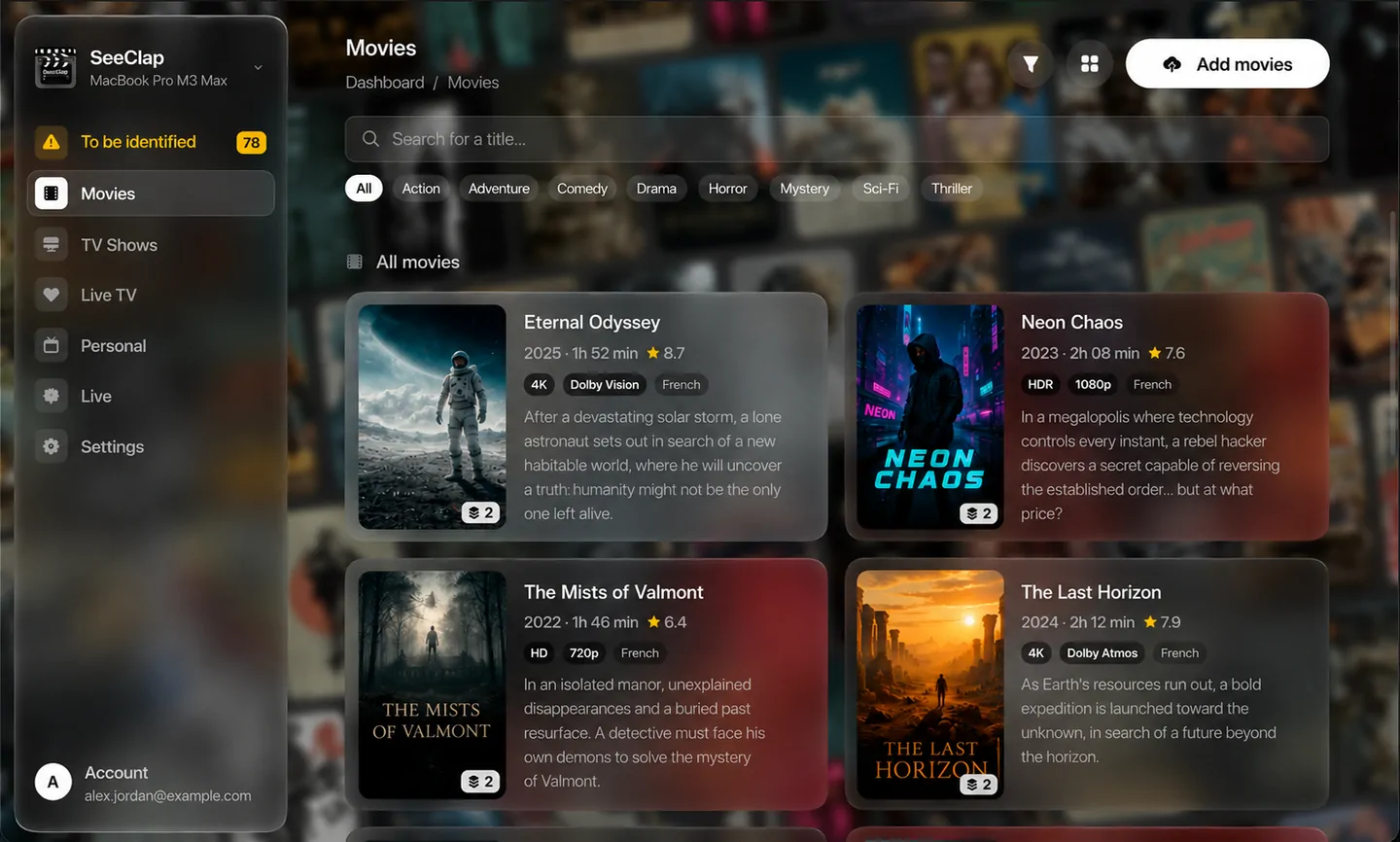
One folder. Every screen.
Nothing to configure, nothing to upload, nothing more to subscribe to. The server runs on a machine you already own, reads the folder you point it at, and your SeeClap apps find it by themselves.
It never leaves your home
Your files are read where they already are. Nothing is copied to a cloud, nothing is analysed elsewhere, and the whole library keeps working with the internet unplugged.
It files itself
A film dropped at the root of the folder is moved into place, read by ffmpeg, matched to its record and offered to your devices — without a second gesture from you.
Found by itself
The server announces itself on your local network. Your phone, your tablet and your television list it with no address, no port and no password to type.
The boring work, done for you
Everything here runs on your own machine. What the server cannot know for certain, it asks — it never decides in your place.
Drop it, it is filed
A film left at the root — or a whole season in its own folder — is moved where it belongs. A file still being copied is never touched.
It asks, it never guesses
The server proposes the works it thinks it recognises and waits for your click. A wrong automatic match is silent: you discover it by starting the wrong film.
Two copies, one work
A 4K and a 1080p of the same film make one line, and the choice comes at the moment you press play. Real duplicates are pointed out, never deleted behind your back.
Subtitles it writes itself
No subtitle track? The server transcribes the audio locally — Apple's engine on a recent Mac, whisper.cpp everywhere else — and writes an .srt file beside the film.
And translates them
Ask for French on a film shot in English: the server transcribes, then translates, on the machine itself. It keeps the original transcription as well.
Your live channels
Import your own playlist. Tick the channels you actually watch, file them into drawers you name yourself, and the thousands you will never open stay out of the way.
A programme guide
Add an XMLTV guide, or let the server keep one up to date on its own. It only stores the schedule of the channels you own.
Several disks, one library
Plug in a second drive when the first one fills up, and move a film from one to the other in a click. An unplugged disk hides its films — it never loses their records.
Send it to the television
Pick a screen from the server's own window and the film starts there. When the television cannot decode the file, the server converts it on the way.
Take it with you
Download an episode into the app before you leave. It plays with the server switched off, on a plane or in a train.
It adapts, only when it must
Direct play is the normal path — the apps decode nearly everything. The server times its own machine once, and converts only when the screen at the other end needs it.
Nothing to configure
No port to open, no IP address to type, no extra account to create. There is exactly one setting: the folder that holds your videos.
What you actually see
The settings window runs on the server's own machine. It is where you tidy the library — your devices only ever see the result.
Poster, definition, audio languages, number of copies: what it takes to choose between two files, before opening either of them.
The apps you already have
SeeClap Server has no player of its own: it feeds the SeeClap apps on your devices. Same library, same records, and a film paused on the television is picked up on the phone.

iPhone & Android
The whole library in your pocket, and downloads for the journey.
iPad & tablets
The same library on a bigger screen, with the versions and audio tracks you own.
Apple TV
The living-room screen, driven by the remote — and by your phone, which can send a film to it.
Android TV
Same thing on Android TV boxes and televisions, including the players that decode everything.
Nothing goes out that you did not send
Your library is a folder on a disk you own. The server reads it, describes it and serves it — and it is not reachable by anyone who is not you.
Bound to your account
The server belongs to the first SeeClap account that claims it. Every request needs a device token; nothing at all answers without one.
Local network only
The server answers devices on your own network and refuses everything coming from the internet. That is deliberate, and it stays that way until encryption ships.
No cloud, no upload
Your files stay on your disk. They are never copied to a server of ours, and we never see their names.
One line per device
Each paired device gets its own key. A lost phone is revoked without disconnecting the television.
Before you install it
Does it come with films or channels?
No — and that is a deliberate position, not an oversight. SeeClap Server ships with no catalogue, no channel list and no address. It serves the files that are already on your disk, and the playlists you provide yourself.
Does it move or rename my files?
It moves a file into films, series or personal videos, because the folder is what says what the file is. It never renames it: correcting a record must not rename something on your disk. And it never deletes anything on its own.
Which formats does it handle?
MKV, MP4, AVI and the rest: the server reads the file itself rather than trusting its extension. Playback is direct whenever your device can decode it, which the SeeClap apps almost always can — and the server converts only when the screen at the other end cannot.
Does it need an internet connection?
Not for your library: filing, reading, subtitling and playing all work with the connection unplugged. The internet is only needed for what genuinely goes out — looking up a film record, reading a playlist from a URL, downloading a programme guide.
Do I need another account?
No. It is the SeeClap account you already use in the apps. The server is bound to it the first time you sign in, and a server installed with no internet at all can be paired with a six-digit code shown on its screen.
What machine does it need?
Any Mac, Windows PC or Linux machine from the last few years. What matters is the disk space your films take and, if you ask for conversion, the processor — the server times its own machine and tells you what it can do.
How much does it cost?
Nothing beyond your SeeClap account. It is in beta: it is free, it is not finished, and what you report is what gets fixed.
It is a beta — tell us what breaks
The defect nobody reports is the one nobody fixes. If something does not work, if a film is filed in the wrong place or if a screen says nothing useful, we want to hear about it.
Turn your computer into your library
One folder to choose, and every screen in the house has your films.
SeeClap is an IPTV and Xtream player rated 4.8/5 on the App Store, available on iPhone, iPad, Apple TV, Android, and Android TV. Bring your M3U or Xtream Codes playlist: it becomes an elegant video library with posters, TV guide, resume playback, and parental controls.
© 2026 SeeClap. All rights reserved